


 Computer Display
 .png) Gaming Console
Gaming Console  Microsoft
  Apple
Apple .png) Samsung
Samsung .png) Huawei
Huawei .png) Xiaomi
Xiaomi .png) OnePlus
OnePlus .png) Sony
Sony  Wiko
Wiko .png) Google
Google .png) Oppo
Oppo .png) Vivo
Vivo .png) Realme
Realme .png) Alcatel
Alcatel .png) Moto
Moto  Smartphones
  Tablets
  Computer
  Smartwatches
  Home Smart Gadgets
  Mobility Gadgets
  Gaming
  Power supply
  Audio
Audio  Protections
  Phone Supports
  Memory Card
  Computer Peripherals
  E-Cigarette Smoker
  Office Automation
  Apple Store
 .png) Samsung Store
Samsung Store .png) Xiaomi Store
Xiaomi Store  Mayline
  LinQ
LinQ .png) Devia
Devia  WUW
WUW  Opening Tools
  Disassembling tools
  Adhesive Glues
  Deoxidation, Disbonding and Cleaning Devices
  Welding, Microwork
  Programmers and testers
  Remanufacturing Screens
  Packaging, Organizing and Displaying Tools
  Personnalisating and Protecting Machines
  Equipment and Lazer Machine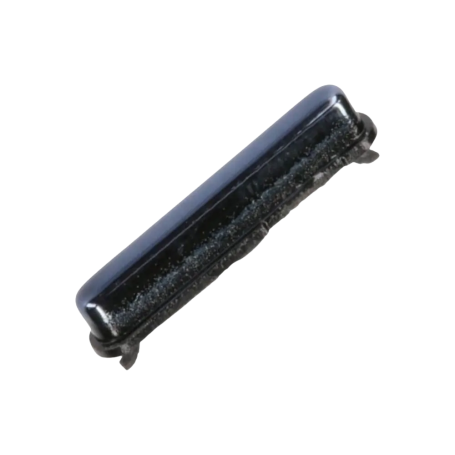

Galaxy A51 (A515) Power Button - Black
Black power button designed for the Samsung Galaxy A51 (A515), used to replace a damaged or faulty original button.
Product Description: Main Flex Cable for Galaxy A51 5G (A516B)
Upgrade and restore the full functionality of your Galaxy A51 5G (A516B) with our premium Main Flex Cable. As a vital component in any smartphone, the flex cable ensures seamless connectivity between the phone’s numerous circuitries, enhancing both its performance and longevity. Designed to meet the highest quality standards, this flex cable is the perfect choice for bringing your device back to life.
Key Benefits:
Seamless Performance: Engineered to deliver efficient communication across the phone’s components, reinstating optimal performance.
Reliable Connectivity: Guarantees uninterrupted connectivity for your device’s internal motherboard connections.
Quality Assurance: Produced under rigorous quality control procedures to provide reliability and durability.
Technical Specifications:
- Type: Main Flex Cable
- Model Compatibility: Galaxy A51 5G (A516B)
- Material: High-quality, durable flex material ensuring longevity
Compatibility:
Specifically designed to fit the Galaxy A51 5G model (A516B), this flex cable is tailored to align perfectly with your device’s specifications, ensuring a snug and effective fit.
Recommended Use:
Ideal for individuals experiencing issues with their Galaxy A51 5G’s internal connectivity. Common symptoms indicating the need for a flex cable replacement include unresponsive hardware buttons, intermittent charging problems, or device boot issues.
Installation Instructions:
Preparation: Ensure your device is powered off and remove any connected peripherals. It’s advisable to work in a static-free environment to prevent any damage to delicate components.
Dismantling: Carefully unscrew and detach the back cover of your Galaxy A51 5G.
Locate the Cable: Identify and gently remove the existing flex cable using precision tools designed for electronics.
Installation: Align and insert the new flex cable, ensuring all connectors are securely fastened. Reassemble the device attentively.
Testing: Once reassembled, power on your device to test and confirm efficient functionality.
Warranty Information:
We stand behind the quality of our product with a comprehensive 12-month warranty, giving you peace of mind and assurance in your purchase. This guarantee excludes Service Packs but covers any defects or performance issues, ensuring your purchase remains risk-free.
Revitalize your Galaxy A51 5G (A516B) with a component that matches its original quality and experience your device's performance like never before. Secure your Main Flex Cable today, facilitating seamless connectivity and performance for your smartphone.

- Spare Parts Type
- Button
- Smartphone Model
- Samsung Galaxy A51