


 Computer Display
.png) Gaming Console
 Microsoft
 Apple
.png) Samsung
.png) Huawei
.png) Xiaomi
.png) OnePlus
.png) Sony
 Wiko
.png) Google
.png) Oppo
.png) Vivo
.png) Realme
.png) Alcatel
.png) Moto
 Smartphones
 Tablets
 Computer
 Smartwatches
 Home Smart Gadgets
 Mobility Gadgets
 Gaming
 Power supply
 Audio
 Protections
 Phone Supports
 Memory Card
 Computer Peripherals
 E-Cigarette Smoker
 Office Automation
 Apple Store
.png) Samsung Store
.png) Xiaomi Store
 Mayline
 LinQ
.png) Devia
 WUW
 Opening Tools
 Disassembling tools
 Adhesive Glues
 Deoxidation, Disbonding and Cleaning Devices
 Welding, Microwork
 Programmers and testers
 Remanufacturing Screens
 Packaging, Organizing and Displaying Tools
 Personnalisating and Protecting Machines
 Equipment and Lazer Machine
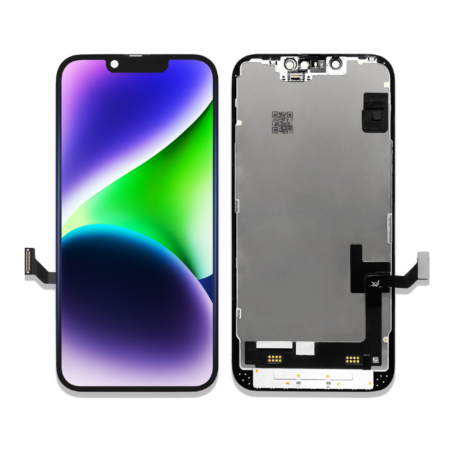


Screen iPhone 14 (Soft OLED) KELAI - Diagnostic
Use Repair Assistant to Finish an iPhone or iPad Repair
On an iPhone 12 or later running iOS 18, when a new Apple screen is installed,
“Finish Repair” will appear next to Screen until you complete the repair using the Repair Assistant.

On an iPhone 12 or later running iOS 18, it is possible to reuse an original Apple screen on another iPhone of the same model.
The date of first use and the condition of the screen can be found in Settings > General > About > Parts & Service History.
How to Run Diagnostics & Finish Repair for iPhone Screen
1. Ensure your device is updated to iOS 18
2. Go to Settings > General > About > Parts & Service History
3. Tap "Restart & Finish Repair" to activate the Repair Assistant
4. Follow the on-screen instructions to complete the calibration
After completing this process, your screen will be fully functional, and there will be no pop-up warning about non-genuine parts.
Important Notes:
- Your iPhone must be connected to Wi-Fi
- Your battery level should be above 20%
- If the process fails, restart your device and try again
- If the repair is not completed, the screen may not function optimally, and some features (True Tone, Face ID) may be disabled until calibration is finalized
The iPhone 14 (Soft OLED) KELAI screen is designed to replace defective screens for iPhone 14 models. This black component, identified by the MPN KELAIDF14, is compatible with devices running iOS 18, allowing for a smooth and efficient installation.
Features
- Part Type: Soft OLED Screen
- Compatibility: iPhone 14
- Brand: KELAI
- MPN: KELAIDF14
Workshop Use
Installing this screen requires standard precautions to avoid damaging internal components. Ensure that the device is powered off and that all connections are properly aligned before securing the screen in place. Using appropriate tools is recommended to ensure a secure installation.
Frequently Asked Questions
Is this screen compatible with other iPhone models?
No, this screen is specifically designed for the iPhone 14.
Can the repair assistant be used with this screen?
Yes, on an iPhone 12 or later model running iOS 18, the repair assistant can be used to finalize the installation of this screen.

- Quality
- SOFT OLED
- Spare Parts Type
- Screen
- Smartphone Model
- iPhone 14