


 Computer Display
.png) Gaming Console
 Microsoft
 Apple
.png) Samsung
.png) Huawei
.png) Xiaomi
.png) OnePlus
.png) Sony
 Wiko
.png) Google
.png) Oppo
.png) Vivo
.png) Realme
.png) Alcatel
.png) Moto
 Smartphones
 Tablets
 Computer
 Smartwatches
 Home Smart Gadgets
 Mobility Gadgets
 Gaming
 Power supply
 Audio
 Protections
 Phone Supports
 Memory Card
 Computer Peripherals
 E-Cigarette Smoker
 Office Automation
 Apple Store
.png) Samsung Store
.png) Xiaomi Store
 Mayline
 LinQ
.png) Devia
 WUW
 Opening Tools
 Disassembling tools
 Adhesive Glues
 Deoxidation, Disbonding and Cleaning Devices
 Welding, Microwork
 Programmers and testers
 Remanufacturing Screens
 Packaging, Organizing and Displaying Tools
 Personnalisating and Protecting Machines
 Equipment and Lazer Machine
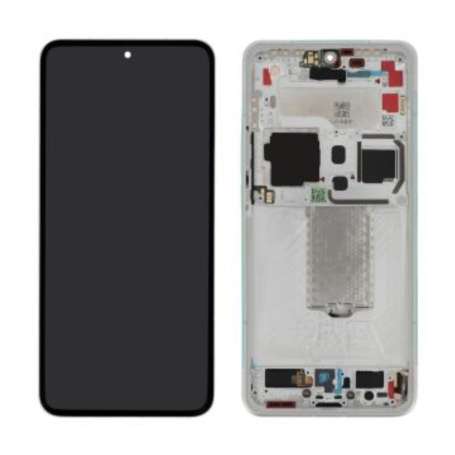

Screen Xiaomi 15 Ultra White (Incell)
Incell replacement screen for the Xiaomi 15 Ultra in white.
Xiaomi 15 Ultra Black Screen (Service Pack) - 560004000O100
Elevate your smartphone's visual experience with the Xiaomi 15 Ultra Black Screen (Service Pack) - 560004000O100. Designed specifically for the Xiaomi 15 Ultra, this replacement screen offers a seamless combination of premium quality and perfect compatibility, ensuring your device looks and operates like new.
Key Benefits:
- Pristine Display Quality: Experience vivid colors and sharp clarity with this OEM screen, meticulously crafted to restore your device's original display brilliance.
- Flawless Fit: Sourced directly from Xiaomi, this screen ensures a perfect fit, preserving the aesthetic appeal and functionality of your smartphone.
- Reliable Performance: Equipped to handle everything from casual browsing to high-definition video streaming without compromise.
Technical Specifications:
- Model: 560004000O100
- Type: Replacement Screen (Service Pack)
- Color: Black
- Brightness & Resolution: Matches original display specifications for a consistent user experience.
- Screen Size: Designed specifically for the Xiaomi 15 Ultra model series.
Compatibility:
- Device: Xiaomi 15 Ultra
- Ensure Compatibility: Please verify your model number to match with 560004000O100 to avoid any compatibility issues.
Recommended Use: Ideal for users who have experienced screen damage or diminished display quality on their Xiaomi 15 Ultra and are seeking a reliable replacement that guarantees a return to optimal visual performance.
Installation Instructions:
- Gather Tools & Prepare Workspace: Ensure you have a gentle, static-free workspace and the necessary tools such as a spudger, tweezers, and screwdrivers.
- Power Off the Device: Completely turn off your Xiaomi 15 Ultra to ensure safety during removal and installation.
- Remove the Current Screen: Carefully detach the existing screen by following a reverse procedure of your device assembly while keeping track of screws and connectors.
- Install the New Screen: Align the Xiaomi 15 Ultra Black Screen with the chassis and connector ports. Secure it properly and check for alignment.
- Test the Installation: Power up your device and test the screen for full functionality before reassembling completely.
Warranty Information: Enjoy peace of mind with a 12-month warranty against manufacturing defects for this product. Note that Service Pack items are typically excluded from extended warranty coverage, reinforcing the need for careful installation.
With the Xiaomi 15 Ultra Black Screen (Service Pack), you're investing in a product that prioritizes quality, compatibility, and visual excellence, ensuring your device remains as exceptional as ever.

- Spare Parts Type
- Screen
- Smartphone Model
- Xiaomi 15 Ultra
- Quality
- In-cell