


 Computer Display
 .png) Gaming Console
Gaming Console  Microsoft
  Apple
Apple .png) Samsung
Samsung .png) Huawei
Huawei .png) Xiaomi
Xiaomi .png) OnePlus
OnePlus .png) Sony
Sony  Wiko
Wiko .png) Google
Google .png) Oppo
Oppo .png) Vivo
Vivo .png) Realme
Realme .png) Alcatel
Alcatel .png) Moto
Moto  Smartphones
  Tablets
  Computer
  Smartwatches
  Home Smart Gadgets
  Mobility Gadgets
  Gaming
  Power supply
  Audio
Audio  Protections
  Phone Supports
  Memory Card
  Computer Peripherals
  E-Cigarette Smoker
  Office Automation
  Apple Store
 .png) Samsung Store
Samsung Store .png) Xiaomi Store
Xiaomi Store  Mayline
  LinQ
LinQ .png) Devia
Devia  WUW
WUW  Opening Tools
  Disassembling tools
  Adhesive Glues
  Deoxidation, Disbonding and Cleaning Devices
  Welding, Microwork
  Programmers and testers
  Remanufacturing Screens
  Packaging, Organizing and Displaying Tools
  Personnalisating and Protecting Machines
  Equipment and Lazer Machine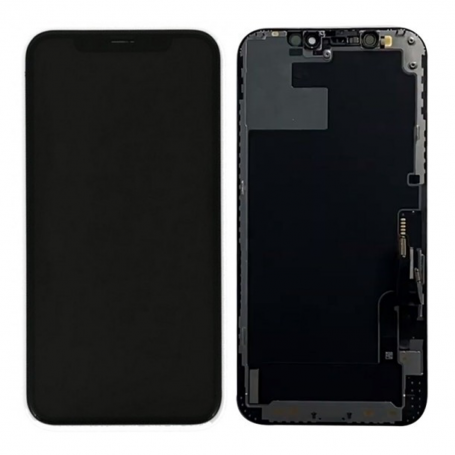


Screen iPhone 14 Pro Max with Proximity Sensor Flex (Original Refurbished) - Supporte Configuration
Use Repair Assistant to Finish an iPhone or iPad Repair
On an iPhone 12 or later running iOS 18, when a new Apple screen is installed,
“Finish Repair” will appear next to Screen until you complete the repair using the Repair Assistant.

On an iPhone 12 or later running iOS 18, it is possible to reuse an original Apple screen on another iPhone of the same model.
The date of first use and the condition of the screen can be found in Settings > General > About > Parts & Service History.
How to Run Diagnostics & Finish Repair for iPhone Screen
1. Ensure your device is updated to iOS 18
2. Go to Settings > General > About > Parts & Service History
3. Tap "Restart & Finish Repair" to activate the Repair Assistant
4. Follow the on-screen instructions to complete the calibration
After completing this process, your screen will be fully functional, and there will be no pop-up warning about non-genuine parts.
Important Notes:
- Your iPhone must be connected to Wi-Fi
- Your battery level should be above 20%
- If the process fails, restart your device and try again
- If the repair is not completed, the screen may not function optimally, and some features (True Tone, Face ID) may be disabled until calibration is finalized
The iPhone 14 Pro Max screen with proximity sensor flex is an original refurbished spare part, designed for iPhone 14 Pro Max models. This component is compatible with devices requiring configuration via the repair assistant, particularly for models using iOS 18.
Features
- Part type: Screen with proximity sensor flex
- Compatibility: iPhone 14 Pro Max
- Condition: Original refurbished
- Brand: R3
- MPN: ori14pm
Workshop Use
The installation of this refurbished screen must be carried out carefully to avoid damaging internal components. Make sure to follow the required configuration procedures for iPhone 12 and later models, including using the repair assistant to finalize the repair.
Frequently Asked Questions
How can I tell if the screen is properly installed?
After installation, check in Settings > General > About > Parts and Service History to confirm that the screen is recognized and properly configured.
Does this screen require special configuration?
Yes, for iPhone 12 and later models running iOS 18, configuration via the repair assistant is necessary to finalize the installation.

- Spare Parts Type
- Screen
- Smartphone Model
- iPhone 14 Pro Max
- Quality
- Original Refurbished