


 Computer Display
.png) Gaming Console
 Microsoft
 Apple
.png) Samsung
.png) Huawei
.png) Xiaomi
.png) OnePlus
.png) Sony
 Wiko
.png) Google
.png) Oppo
.png) Vivo
.png) Realme
.png) Alcatel
.png) Moto
 Smartphones
 Tablets
 Computer
 Smartwatches
 Home Smart Gadgets
 Mobility Gadgets
 Gaming
 Power supply
 Audio
 Protections
 Phone Supports
 Memory Card
 Computer Peripherals
 E-Cigarette Smoker
 Office Automation
 Apple Store
.png) Samsung Store
.png) Xiaomi Store
 Mayline
 LinQ
.png) Devia
 WUW
 Opening Tools
 Disassembling tools
 Adhesive Glues
 Deoxidation, Disbonding and Cleaning Devices
 Welding, Microwork
 Programmers and testers
 Remanufacturing Screens
 Packaging, Organizing and Displaying Tools
 Personnalisating and Protecting Machines
 Equipment and Lazer Machine
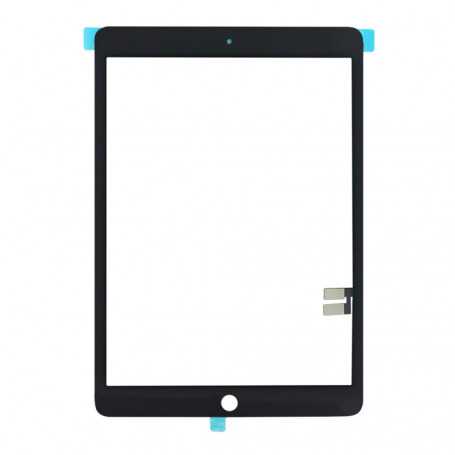


Touch Screen Digitizer iPad 10.2" (7/8/9th) (A2197/A2198/A2200/A2270/A2428/A2429/A2430/A2602/A2603/A2604/A2605) Black + Sticker
Touch glass iPad 10.2" (iPad 7e/8e) (A2197/A2198/A2200/A2270/A2428/A2429/A2430) Black + Sticker
Tips for successfully installing your touch glass iPad
1 - Before any repair, thoroughly clean the parts and make sure there is as little dust as possible.
2 - Check that the frame is not bent. If it is, it must be straightened first.
3 - It is strongly recommended to add extra adhesive (e.g., B7000) to the adhesive already present on the part.
4 - For better adhesion, it is best to heat the adhesive before installing the glass.
5 - We recommend holding the screen with clamps for a few hours after the repair.
Small note about the iPad home button
Although our touch glasses come with a home button, we strongly recommend keeping the original one. This way, you can still keep the fingerprint.
To prevent the home button from coming unstuck after the glass is installed, we recommend bonding the home button plate with instant adhesive.

- Spare Parts Type
- Touch Screen